 站长资讯网
站长资讯网
css实现文字横排的方法:首先创建一个HTML示例文件;然后创建p标签;最后通过“writing-mode: horizontal-tb;”属性实现文字横排即可。

本文操作环境:windows7系统、HTML5&&CSS3版、Dell G3电脑。
css怎么实现文字横排?
css实现文字横向排列/竖向排列
writing-mode:书写模式
| 属性值 | 效果 |
|---|---|
| horizontal-tb | 横向排列 |
| vertical-rl | 竖向排列,从右到左 |
| vertical-lr | 竖向排列,从左到右 |
举例如下:
html:
<p class="textBox"> <h1>horizontal-tb:横向排列</h1> <h1>vertical-rl:纵向排列,从右到左</h1> <h1>vertical-lr:纵向排列,从左到右</h1></p>
css:
<style> .textBox h1{ width: 200px; height: 200px; margin: 10px 10px; padding: 10px; float: left; } .textBox h1:nth-of-type(1){ writing-mode: horizontal-tb; background-color: #42b983; } .textBox h1:nth-of-type(2){ writing-mode: vertical-rl; background-color: #42a8b9; } .textBox h1:nth-of-type(3){ writing-mode: vertical-lr; background-color: #81b9aa; } </style>
实现效果: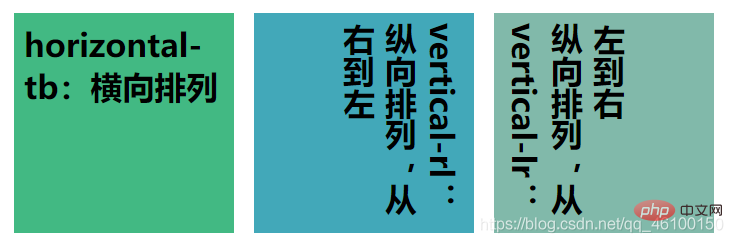
推荐学习:《css视频教程》
