 站长资讯网
站长资讯网css中设置段落缩进的属性是“text-indent”,语法格式“text-indent:length|%;”;当值为“length”时可定义固定的缩进,当值为“%”类型时可定义基于父元素宽度的百分比的缩进。

本教程操作环境:windows7系统、CSS3&&HTML5版、Dell G3电脑。
css中设置段落缩进的属性是“text-indent”。
示例:
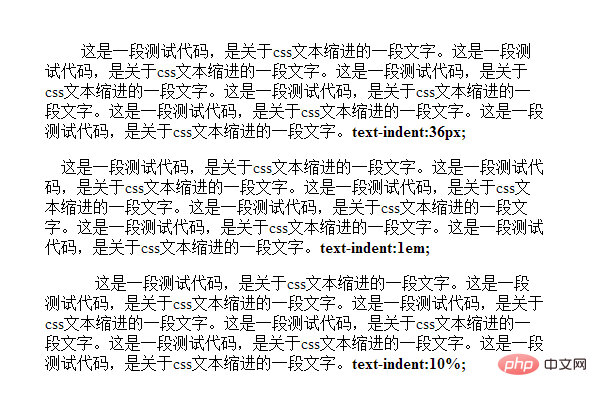
<!DOCTYPE html> <html> <head> <meta charset="UTF-8"> <title>首行缩进</title> <style> .demo{ width: 500px; height: 200px; margin: 50px auto; } .p1{ text-indent:36px; } .p2{ text-indent:1em; } .p3{ text-indent:10%; } </style> </head> <body> <div class="demo"> <p class="p1">这是一段测试代码,是关于css文本缩进的一段文字。这是一段测试代码,是关于css文本缩进的一段文字。这是一段测试代码,是关于css文本缩进的一段文字。这是一段测试代码,是关于css文本缩进的一段文字。这是一段测试代码,是关于css文本缩进的一段文字。这是一段测试代码,是关于css文本缩进的一段文字。<b>text-indent:36px;</b></p> <p class="p2">这是一段测试代码,是关于css文本缩进的一段文字。这是一段测试代码,是关于css文本缩进的一段文字。这是一段测试代码,是关于css文本缩进的一段文字。这是一段测试代码,是关于css文本缩进的一段文字。这是一段测试代码,是关于css文本缩进的一段文字。这是一段测试代码,是关于css文本缩进的一段文字。<b>text-indent:1em;</b></p> <p class="p3">这是一段测试代码,是关于css文本缩进的一段文字。这是一段测试代码,是关于css文本缩进的一段文字。这是一段测试代码,是关于css文本缩进的一段文字。这是一段测试代码,是关于css文本缩进的一段文字。这是一段测试代码,是关于css文本缩进的一段文字。这是一段测试代码,是关于css文本缩进的一段文字。<b>text-indent:10%;</b></p> </div> </body> </html>
效果图:
【推荐教程:CSS视频教程】
说明:
text-indent 属性规定文本块中首行文本的缩进。
注意: 负值是允许的。如果值是负数,将第一行左缩进。
属性值:
| 值 | 描述 |
|---|---|
| length | 定义固定的缩进。默认值:0。 |
| % | 定义基于父元素宽度的百分比的缩进。 |
