 站长资讯网
站长资讯网在CSS中,字体粗细可用font-weight属性来修改,只需要将font-weight属性的值设置为“bold”、“bolder”、“lighter”或“500”、“600”、“700”、“800”、“900”值即可,属性值越大字体越粗。

本教程操作环境:windows7系统、CSS3&&HTML5版、Dell G3电脑。
在CSS中,字体粗细可以使用font-weight属性来修改。
CSS font-weight属性
font-weight属性可以用于设置文本文字的粗细。属性值越大字体越粗。
属性值:
| 值 | 描述 |
|---|---|
| normal | 默认值。定义标准的字符。 |
| bold | 定义粗体字符。 |
| bolder | 定义更粗的字符。 |
| lighter | 定义更细的字符。 |
|
定义由细到粗的字符。400 等同于 normal,而 700 等同于 bold。 |
【推荐教程:CSS视频教程 】
示例:
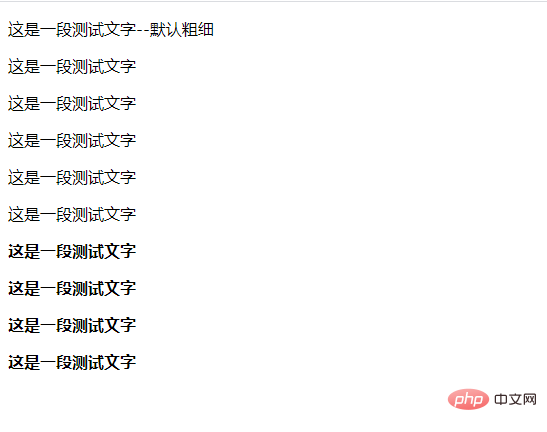
<!DOCTYPE html> <html> <head> <meta charset="UTF-8"> <title>css 文字加粗</title> <style> .a1{ font-weight:100; } .a2{ font-weight:200; } .a3{ font-weight:300; } .a4{ font-weight:400; } .a5{ font-weight:500; } .a6{ font-weight:600; } .a7{ font-weight:700; } .a8{ font-weight:800; } .a9{ font-weight:900; } </style> </head> <body> <div> <p>这是一段测试文字--默认粗细</p> <p class="a1">这是一段测试文字</p> <p class="a2">这是一段测试文字</p> <p class="a3">这是一段测试文字</p> <p class="a4">这是一段测试文字</p> <p class="a5">这是一段测试文字</p> <p class="a6">这是一段测试文字</p> <p class="a7">这是一段测试文字</p> <p class="a8">这是一段测试文字</p> <p class="a9">这是一段测试文字</p> </div> </body> </html>