 站长资讯网
站长资讯网
vscode支持php函数跳转的方法
让vscode支持php函数跳转功能
1、正确安装了php。
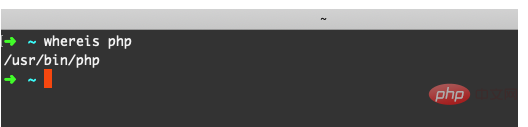
2、在命令行执行 whereis php 查看PHP安装路径
3、在vscode中安装扩展插件 PHP IntelliSense, 如果已经安装跳过。
4、打开vscode配置,在扩展配置中找到PHP IntelliSense的配置。
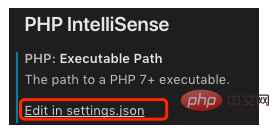
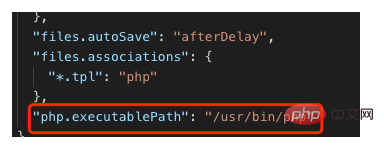
5、点击配置文件,编辑 php.executablePath ,将 null 改为php的安装路径。
6、重新启动 vscode。
推荐:《vscode教程》
vscode支持php函数跳转的方法
让vscode支持php函数跳转功能
1、正确安装了php。
2、在命令行执行 whereis php 查看PHP安装路径
3、在vscode中安装扩展插件 PHP IntelliSense, 如果已经安装跳过。
4、打开vscode配置,在扩展配置中找到PHP IntelliSense的配置。
5、点击配置文件,编辑 php.executablePath ,将 null 改为php的安装路径。
6、重新启动 vscode。
推荐:《vscode教程》
